Category Archives: Uncategorized
Protected: IT week – apple watch demo
Concurrency vs Asynchronous
http://blog.stevenedouard.com/asynchronousness-vs-concurrency/
Concurrency
There are various different ways of accomplishing concurrency. One of them is parallelism–having multiple CPUs working on the different tasks at the same time. For example, its like having more than 1 chef working on 5 recipes AT THE SAME TIME.
But parallelism is not the only way to achieve concurrency. Another is by task switching, which works like this: Task A works up to a certain point, then the CPU working on it stops and switches over to task B, works on it for a while, and then switches back to task A. If the time slices are small enough, it may appear to the user that both things are being run in parallel, even though they’re actually being processed in serial by a multitasking CPU.
A characteristic of task switching is asynchronous. Asynchronous is when a task DOES NOT BLOCK the worker, and the worker is free to work on other parts of other tasks.
Asynchronous is when a chef is working on 5 dishes at the same time. Going through steps of each recipes one after another WITHOUT IT WAITING (or blocking in IT terms). The chef does not let the recipe step BLOCK HIM from moving on to other recipe tasks.
For example
He preps dish 1, apple pie. then puts it into the oven for a 1 hour bake. Now, the baking process DOES NOT BLOCK him from working on other recipes. So that he does not waste time waiting on the oven, he moves on to other recipe(s).
While dish 1 bakes, he moves on to dish 2, which to chop up some Potatoes and salt some beef chunks. After the potatoes are prepped, he throws them into a pot and starts simmering them with some beef chunks. The simmering process DOES NOT BLOCK HIM from moving on to other recipes. Thus, he is free to move on to other tasks of other recipes.
He then moves on to dish 3, which is to simply toss some salad. He is done with dish 3.
He then goes on to dish 4, which to boil some pasta. Fire on high and the water warms. The boiling process DOES NOT BLOCK him from working on other recipes, so he moves on.
For dish 5, he just chops some fruits and throws yogurt on top. Done!
Dish 4 (al dente pasta) water has now boiled and it DINGS our chef so he knows. He then comes back to Dish 4, salts the water, then throw in pasta. The pasta needs to cook for a few minutes. This cooking process DOES NOT BLOCK him, so he moves on to other dishes.
All Dishes are not processing in some way…so the chef now waits. After a few minutes, Dish 4 (pasta) finishes boiling. It DINGS the chef to let him know. The chef takes the pasta out and finishes preparing for it.
Now, the chef has nothing to do and waits for the next DING.
After an hour, dish 1 finishes baking and DINGS him. Letting him know that dish 1 needs attention. The chef goes to dish 1, takes out the apple pie..puts some vanilla ice cream on the side, and done.
He now has nothing to do and waits. Then after another hour, dish 2 finishes simmering and a timer DINGS him. He then slowly spoons out the morsels, chops some parsley, and finishes dish 2.
So as you can see, asynchronous means that there is one worker, one process, one chef…but its working on multiple tasks.
No task is holding on to him. Whenever he hits a point of a recipe where the recipe needs to take some time (bake, simmer, boil..etc), then he moves on to the next recipe’s task.
In IT term, asynchronous-ness is the ability to NOT stop on a task which depends on an external system (like reading a file from the file system, or loading data from the internet) and continue the processing of the application.
Protected: Installing and using maestro-cli
setting JAVA environment variable
Windows 8
1) First install Java onto your machine
2) You then have to set your environment variable JAVA_HOME to be the location where the bin directory of all the .dlls and .exes are.
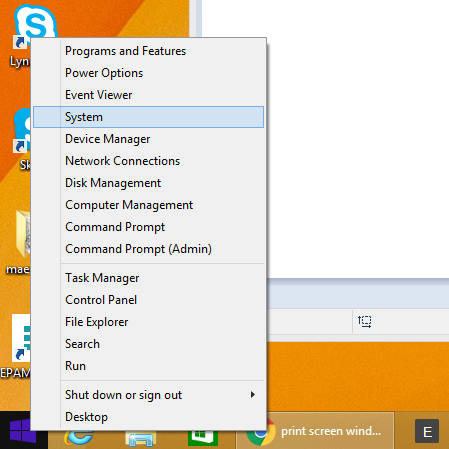
Right click the windows icon on the very bottom left. Select System
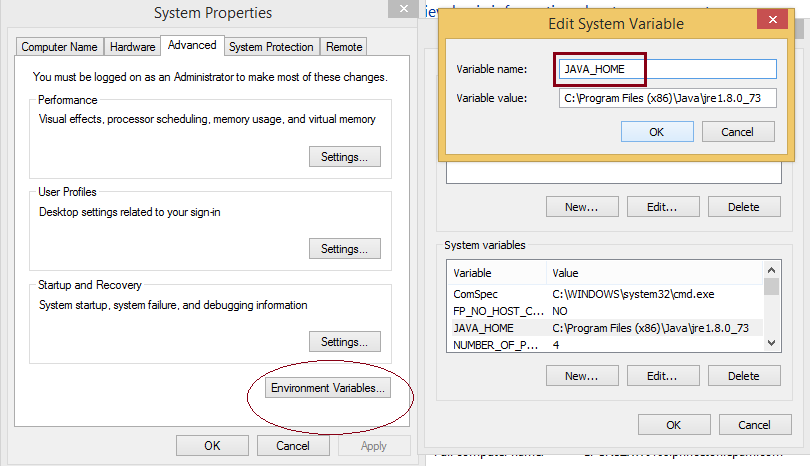
Click on the Environmental variable button. And look for the JAVA_HOME variable. If its there, edit it. If its not, click on ‘New’, and create the JAVA_HOME variable.
The Variable value is where the location is. What we’re looking for is the location to the bin folder where all the .exe and .dll are. Hence, after you install Java, its usually somewhere in C://Program Files/Java/JRE_x.xx.xx/.
In our case, if you start from the C directory, find Program Files, then find Java. In my case, I found it at C:\Program Files (x86)\Java\jre1.8.0_73
Thus, you just paste that into the environment variable.
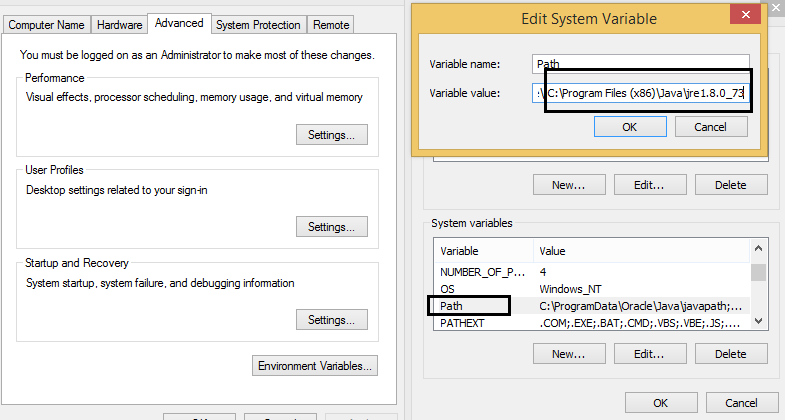
3) you then have to add the directory location of the PATH variable. When you see it, click edit, and then go to the end of the string. Then type in:
;C:\Program Files (x86)\Java\jre1.8.0_73
notice the semi-colon. this is to separate this entry from the other entries.
APN server notes
To insert device
db.deviceCollection.insert({ “device_id” : “f0bafec6 be2a9e1a c31c9cb0 8c6589df 0bc1a7c4 ac9d7767 e63b7656 07c62145”, “bundle_id” : “com.rtsao.localapn”, “description” : “yes” })
cURL
ref – http://makandracards.com/makandra/1145-how-to-send-http-requests-using-curl
curl http://localhost:6680/results -GET
to send a HTTP request
Download a Single File
The following command will get the content of the URL and display it in the STDOUT (i.e on your terminal).
$ curl http://www.centos.org
ryh:Desktop rickytsao$ curl http://www.centos.org
301 Moved Permanently
ryh:Desktop rickytsao$
Download file and store in file
To store the output in a file, you an redirect it as shown below. This will also display some additional download statistics.
$ curl http://www.centos.org > centos-org.html
Mongod Address already in use for socket
Problem
Last login: Fri Feb 12 10:54:07 on ttys002
ryh:~ rickytsao$ mongod
2016-02-13T11:07:24.914+0800 E NETWORK [initandlisten] listen(): bind() failed errno:48 Address already in use for socket: 0.0.0.0:27017
2016-02-13T11:07:24.914+0800 E NETWORK [initandlisten] addr already in use
2016-02-13T11:07:24.941+0800 W – [initandlisten] Detected unclean shutdown – /data/db/mongod.lock is not empty.
2016-02-13T11:07:25.001+0800 I STORAGE [initandlisten] exception in initAndListen: 98 Unable to lock file: /data/db/mongod.lock errno:35 Resource temporarily unavailable. Is a mongod instance already running?, terminating
2016-02-13T11:07:25.004+0800 I CONTROL [initandlisten] dbexit: rc: 100
Solution
Check to see what mongo database instance is running on port 27017
ryh:~ rickytsao$ sudo lsof -i :27017
Password:
COMMAND PID USER FD TYPE DEVICE SIZE/OFF NODE NAME
mongod 442 rickytsao 5u IPv4 0xd82daecd96900a0b 0t0 TCP *:27017 (LISTEN)
ryh:~ rickytsao$ KILL -9 442
Then, start up your mongo database
ryh:~ rickytsao$ mongod
2016-02-13T11:10:14.375+0800 W – [initandlisten] Detected unclean shutdown – /data/db/mongod.lock is not empty.
2016-02-13T11:10:14.384+0800 I JOURNAL [initandlisten] journal dir=/data/db/journal
2016-02-13T11:10:14.384+0800 I JOURNAL [initandlisten] recover begin
2016-02-13T11:10:14.408+0800 I JOURNAL [initandlisten] recover lsn: 16539606
2016-02-13T11:10:14.408+0800 I JOURNAL [initandlisten] recover /data/db/journal/j._2
2016-02-13T11:10:14.408+0800 I JOURNAL [initandlisten] recover skipping application of section seq:14612540 < lsn:16539606
2016-02-13T11:10:14.408+0800 I JOURNAL [initandlisten] recover skipping application of section seq:14662560 < lsn:16539606
2016-02-13T11:10:14.408+0800 I JOURNAL [initandlisten] recover skipping application of section seq:14761940 < lsn:16539606
2016-02-13T11:10:14.411+0800 I JOURNAL [initandlisten] recover cleaning up
2016-02-13T11:10:14.411+0800 I JOURNAL [initandlisten] removeJournalFiles
2016-02-13T11:10:14.411+0800 I JOURNAL [initandlisten] recover done
2016-02-13T11:10:14.480+0800 I JOURNAL [durability] Durability thread started
2016-02-13T11:10:14.480+0800 I JOURNAL [journal writer] Journal writer thread started
2016-02-13T11:10:14.480+0800 I CONTROL [initandlisten] MongoDB starting : pid=85510 port=27017 dbpath=/data/db 64-bit host=ryh.princeton.epam.com
2016-02-13T11:10:14.480+0800 I CONTROL [initandlisten]
2016-02-13T11:10:14.480+0800 I CONTROL [initandlisten] ** WARNING: soft rlimits too low. Number of files is 256, should be at least 1000
2016-02-13T11:10:14.480+0800 I CONTROL [initandlisten] db version v3.0.7
2016-02-13T11:10:14.480+0800 I CONTROL [initandlisten] git version: 6ce7cbe8c6b899552dadd907604559806aa2e9bd
2016-02-13T11:10:14.480+0800 I CONTROL [initandlisten] build info: Darwin mci-osx108-13.build.10gen.cc 12.3.0 Darwin Kernel Version 12.3.0: Sun Jan 6 22:37:10 PST 2013; root:xnu-2050.22.13~1/RELEASE_X86_64 x86_64 BOOST_LIB_VERSION=1_49
2016-02-13T11:10:14.480+0800 I CONTROL [initandlisten] allocator: system
2016-02-13T11:10:14.480+0800 I CONTROL [initandlisten] options: {}
2016-02-13T11:10:14.503+0800 I NETWORK [initandlisten] waiting for connections on port 27017
Thread and local stack variables
http://stackoverflow.com/questions/79923/what-and-where-are-the-stack-and-heap
Angular/Server layout
from the backend (Server)
|
1 |
node server.js |
starts up and loads
- express
- path
- bordy-parser
- morgan
- mongoose
- config file
…
|
1 2 |
var express = require("express"); var app = express(); |
We have our express and app variables and initializes them using other modules.
Then we use mongoose to connect to database and make sure it checks.
Then it loads up our routes by using api.js. We require the function that’s in /app/routes/api.js, and throw in our app and express variables. Thus, we get our apiRoutes, and then init the api root path at /api.
|
1 2 |
var apiRoutes = require('./app/routes/api')(app, express); app.use('/api', apiRoutes); |
This is where our backend router takes care of HTTP verbs GET/POST/PUT/DELETE…etc by implementing function definitions such as:
/app/routes/api.js
|
1 2 3 4 5 6 7 8 |
module.exports = function(app, express) { var apiRouter = express.Router(); apiRouter.post('/createSampleUser', func() { .... ... ... return apiRouter; |
Once the router is initialized in api.js, we say we want send the browser the index.html like for a root url access:
|
1 2 3 |
app.get('*',function(req,res){ res.sendFile(path.join(__dirname + '/public/views/index.html')); }); |
The start of this html file will load up this router in api.js among other angular js files such as controllers, services, etc.
from the front end – index.html loads up js scripts
When the server starts, this index.html gets loaded up. Angular loads up its controllers, services, etc via js script files at the beginning of this index.html file.
|
1 2 3 4 |
<head> <script src="js/app.routes.js"></script> <script src="js/app.js"></script> </head> |
Front End Routing templates to Controller
In the app.routes.js file, we create our routerRoutes module using Angular module ngRoute. We use .config and assign templateUrl, controller, and controllerAs for each individual html page. We will be using this module in another module shortly.
Notice the angular.module, what this means is that we it to group our defined modules together and have angular run and use all of these modules via injection dependencies.
see https://docs.angularjs.org/guide/module
Just like how the main function wire everything together, module is Angular’s way of bootstrapping all of our functionality.
Boostrap is a technique of loading a program into a computer by means of a few initial instructions that enable the introduction of the rest of the program from an input device.
public/js/api.routes.js
|
1 2 3 4 5 6 7 8 9 10 11 12 13 14 15 16 17 18 |
// inject ngRoute for all our routing needs angular.module('routerRoutes', ['ngRoute']) // configure our routes .config(function($routeProvider, $locationProvider) { $routeProvider // route for the home page .when('/', { templateUrl : 'views/pages/home.html', //dir starts at /public controller : 'homeController', controllerAs: 'home' }) ..... ..... $locationProvider.html5Mode(true); }); |
Then we also have the app.js. What this app.js means for this particular example is that it is the Angular app. It contains the controllers, which uses services via dependency injections.
First, notice that it uses our routerRoutes. It injects the routerRoutes module by passing it into the parameter array.
public/js/app.js
|
1 2 3 4 5 6 7 8 9 |
angular.module('routerApp', ['routerRoutes', 'authService', 'ngAnimate']) //we pass in service Auth, defined in authService.js .controller('mainController', function(Auth) { var vm = this; // declare a bigMessage variable to display in our view vm.bigMessage = 'A smooth sea never made a skilled sailor.'; }) |
What this means is that we define a module called routerApp, which uses routerRoutes defined in app.routes.js for its routing mechanism. In our routing mechanism, we have .when(‘url’, {..}), which routes templates to controllers. Hence, we define these controllers by declaring our .controller in our app.js.
Services used by Controllers
Also notice the authService in the parameter array. authService is a service defined in authService.js.
authService.js
|
1 |
angular.module('authService', []) |
so we declare a module called authService, and we use .factory to create this service:
|
1 |
.factory('Auth', function($http, $q, AuthToken) { |
First, we can use either factory, or service. In factory, we return a object, which can be injected into a controller.
Here’s an example:
|
1 2 3 4 5 6 7 8 9 10 11 12 13 14 15 |
.factory('Auth', function($http, $q, AuthToken) { // create auth factory object var authFactory = {}; //declaring property function for authFactory object authFactory.createSampleUser = function(name, username, password) { AuthToken.getToken(); $http.post('http://localhost:8080/api/createSampleUser'); }; console.log('authService.js - (frontend) returning factory Auth object'); return authFactory; }) |
Notice the creation of authFactory, its usage and declaration of properties, and then the return of that object.
Where as in service, you see that we attach attributes and behavior to this:
|
1 2 3 4 5 6 7 8 9 |
app.service('myService', function() { // service is just a constructor function // that will be called with 'new' this.sayHello = function(name) { return "Hi " + name + "!"; }; }); |
When inside a service we are dealing with the object using this and not returning anything.
Both are singletons.
Angular services are:
Lazily instantiated – Angular only instantiates a service when an application component depends on it. So when another component uses it by calling it in its dependency array parameter, Angular will instantiate that one singleton Service and then pass it via reference to the component in need.
Singletons – Each component dependent on a service gets a reference to the single instance generated by the service factory.
From the knowledge above, we can see that we declared an AuthFactory for getToken setToken. Then we use the AuthFactory, inject it into Auth, which we use to see if the current browser has a token, then uses the http to call createSampleUser in our backend API.